Website logo
Welcome to Refresh
Refresh Guide
Concepts
Segmentation & visibility
Layout & design
Homescreen
Guide
Technical Setup
Overview
Configure your custom subdomain
Customize your system email
Connect your HRIS
Get Started
Explore the dashboard
Customize the app welcome experience
Access & manage layouts
Design your layout
Create content
User & Group Management
Onboard & edit users
Manage admins & roles
Manage groups & tags
Posts
Post options
Add & manage posts
Preview content
Post → Message workflow
Post → Challenge workflow
Engagement
Engagement options
Challenges
Rewards
Plan a Points system
View & adjust Points
Challenge → Message workflow
Events
Set up & manage Events
Community
Raves (Recognition)
Forms
Why Refresh Forms?
Marketplace
What is Marketplace?
Build a Marketplace
Messages
Messages
Tutorials
Build a layout in 5 steps
Get users to...
Set up a preview for others
Troubleshooting & Tips
Check content visibility
Review your layout setup
Make layout edits
Troubleshoot Challenges
Engage users effectively
Docs powered by Archbee
Guide
Posts

Add & manage posts

2 min

Who can do this:

  • Anyone with edit permissions for News & Notices, Focus Content, Media Collection, and Media Items.

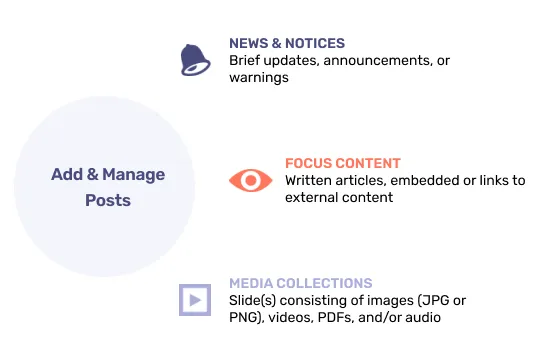
Focus Content, News & Notices, and Media Collections are managed in the Posts menu of the dashboard. Forms are created and managed separately, in the Forms menu.
Document image


In this section

  • Post News & Notices 
  • Add Focus Content
  • Create a Media Collection
  • Manage media library
  • Images & links
Updated 29 Sep 2025
L
PREVIOUS
Media Collections
NEXT
Add News & Notices
Docs powered by Archbee