Walk 35,000 steps every week
Who can do this:
- Anyone with the editing permissions for Challenges, Homescreen, and Messages
Set up an ongoing, attainable weekly step goal to inspire employees to be physically active.
Here is a summary of this challenge:
- Goal: Walk 35,000 steps every week, on an ongoing basis. Steps must be completed daily.
- Challenge type: Step challenge that tracks steps through the user's mobile device.
- Incentive: Reach the top of the leaderboard.
- Competition type: Compete with others.
- Preparation: Employees need to have downloaded the app to their mobile device for steps to be tracked. In the user list, a mobile icon indicates the app has been downloaded.
Add a Step Challenge
To start a step challenge:
- Go to Engagement ➤ Challenges and click Add.
- Select Step Challenge.
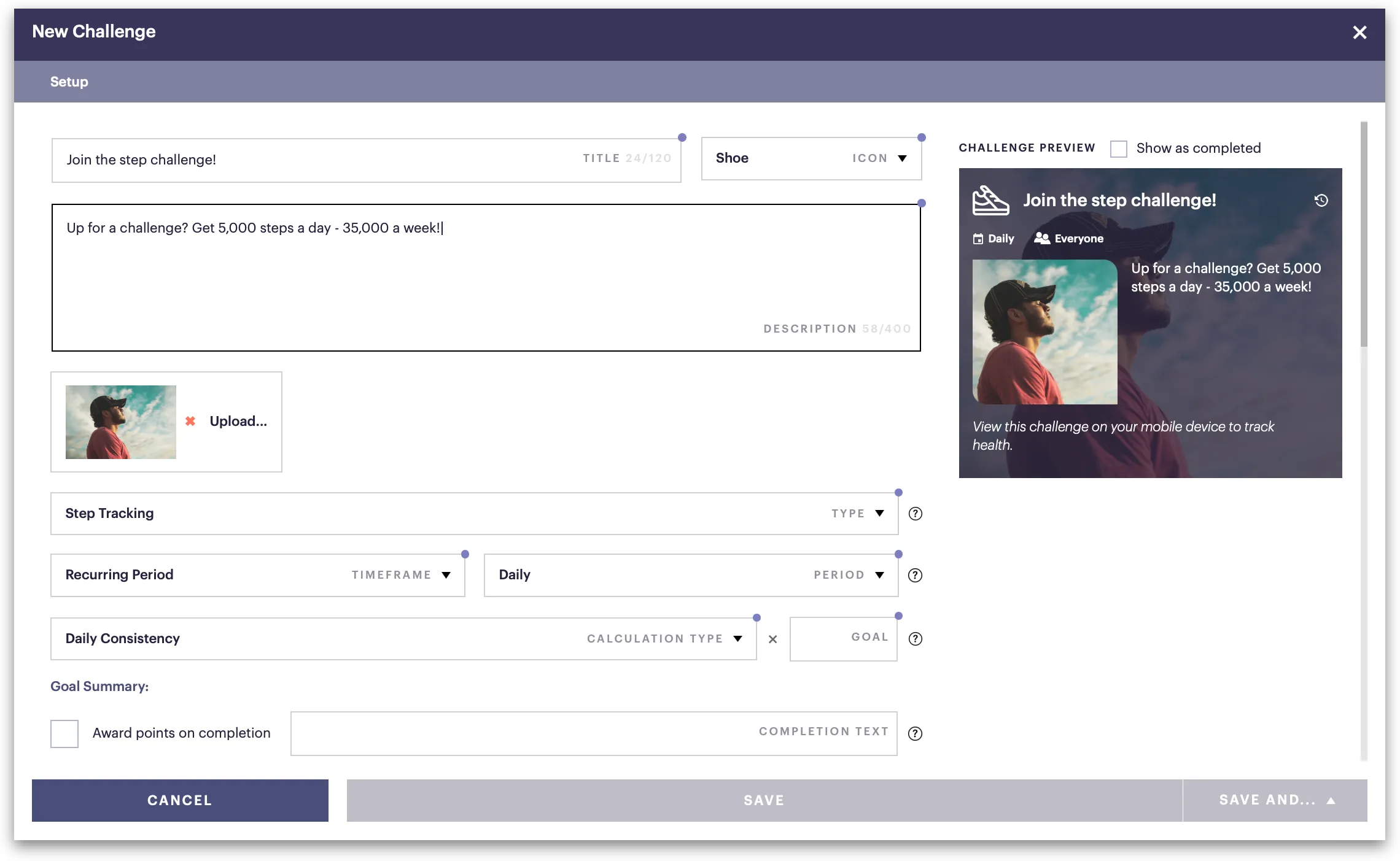
Complete the setup
In the setup, fill in the details:
Field | Description |
|---|---|
Title | Enter a header (e.g., Join the step challenge!). |
Icon | Select an icon (e.g. Shoe). |
Description | This is generated for you, based on how you complete the fields below. |
Type | Select Step Tracking. |
Timeframe | Select Recurring Period. |
Period | Select Weekly. This means they can receive one challenge completion per week |
Calculation type | Select Daily Consistency to require a specific percentage of the total weekly steps to be completed daily. This mean they can't complete all their steps on one or two days. |
Goal | Enter the minimum number of steps they have to complete each day (e.g., 5,000). |
Goal summary | This is automatically generated for you. Click Copy to description. |
Availability | Assign the challenge by selecting groups, teams, or tags. |
Save & close
In the bottom-right of the challenge, select Save and close.
Since this is recurring, upon saving, it is immediately visible and scoring begins, unless you hide or disable it.
When does scoring reset in a weekly challenge?
Since the score in a weekly challenge resets every Sunday at midnight, it is recommended to keep your challenge hidden until Monday morning. To learn more, refer to Recurring Challenges.
Send a message
After you've saved the challenge, send a message about it:
- Go to Messages ➤ Compose.
- Choose recipients, select a channel and enter a brief message (e.g., Join the step challenge!)
- Tick Include link to app content and select the challenge.
- Click Send message.
Your message immediate goes out to the recipients you selected, and the challenge continues until you disable or remove it.