Promote & share an Event
5 min
Who can do this:
- Anyone with viewing permissions for Events and Users, and editing permission for Messages
Promote your event in the app and through your company channels, and message attendees with updates or follow-up surveys to gather feedback.
To start:
- Go to Events and click the megaphone icon next to the event you want to promote.
- From there, choose from the options below.
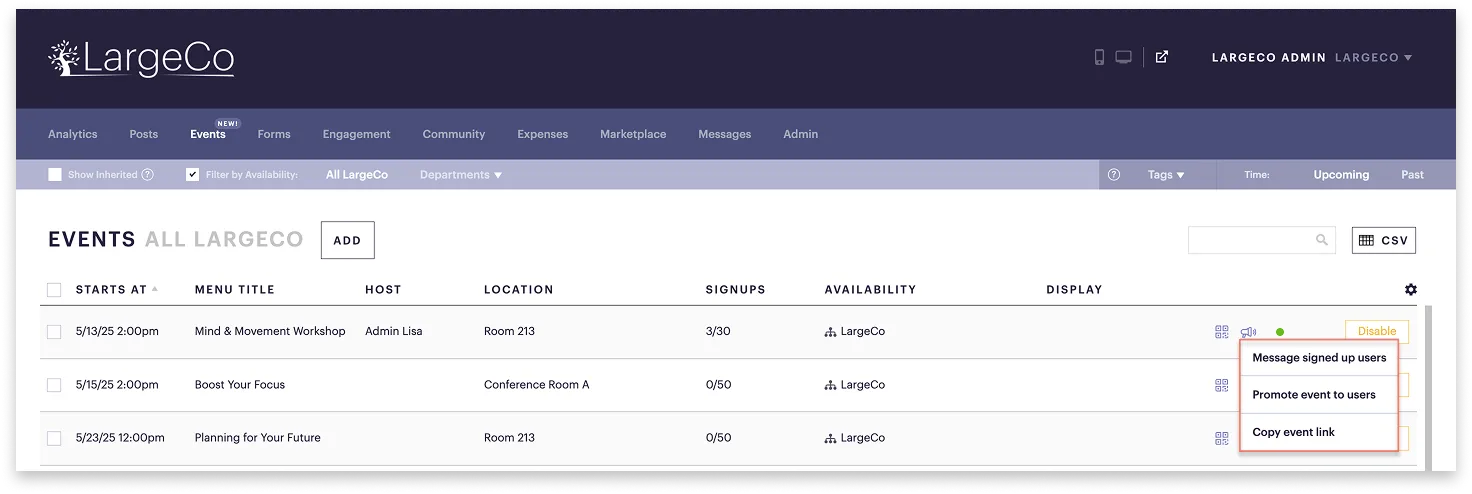
Message signed up users
Send a message to those who've already registered.
- The Compose page opens with a pre-filled message linked to the event, and the attendees already selected for you.
This is a quick way to send updates, reminders, or surveys, before and after your event.
Promote your event to users
Send a message to promote it to a wider audience. By default, it's set to go to all users unless you select specific availability.
- The Compose page opens with a pre-filled message linked to the event.
- Send immediately or schedule it in advance.
Copy the event link
Share the event outside the app via company emails, intranet, or newsletters.
- Paste the link into your communication and share!
The link brings users directly into the app to view event details and register.
Want to highlight your event even more?
You can feature it directly on your app’s homescreen for maximum visibility.