Auto-remind attendees
1 min
Boost event attendance and reduce no-shows by scheduling a reminder to attendees shortly before your event starts.
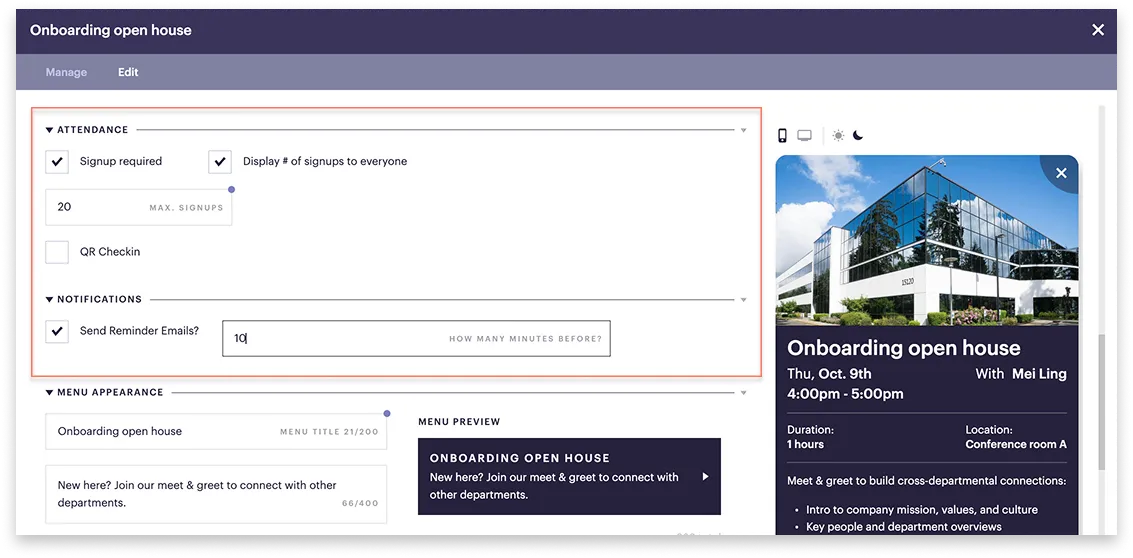
To set auto-reminders:
- Go to Events and select your event from the list.
- In the top-left corner select the Edit tab.
- If you haven't yet, fill in the Attendance section.
- Tick Signup required.
- Optionally tick, Display # of signups to everyone.
- Enter the number of max signups.
- Under Notifications:
- Tick Send reminder emails.
- Enter how many minutes before the event you'd like the reminder to be sent.
- Click Save.
Anyone who has signed up for the event will receive the reminder to their email.